RGB split effect
Separate each component's RGB(red, green, blue) colors and display them on the screen with an offset:
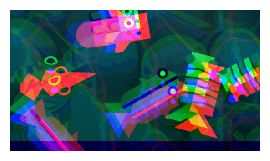
Each color channel has its own X and Y offset (in pixels), so you can control exactly how far the red, green and blue copies are shifted apart. The further they are offset, the more pronounced the chromatic aberration looks.
Because the offsets can be changed at runtime with events, this effect is often animated to create glitch, damage or teleport transitions (for example by briefly increasing the offsets, then bringing them back to 0).
Note
This effect only works on 2D layers and objects.
Reference
All effects are listed in the effects reference page.